
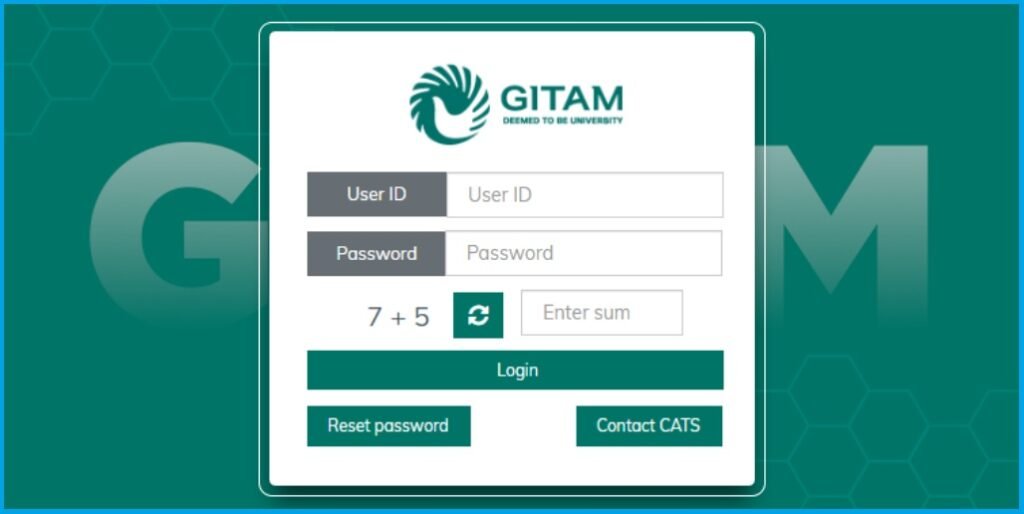

Introduction: Understanding GITAM Web Login
The GITAM web login portal is the official gateway for students, faculty, and parents to access academic, administrative, and communication services of GITAM (Gandhi Institute of Technology and Management). Whether you’re submitting assignments, viewing attendance, or checking exam results, everything happens through this secure online portal.
GITAM’s digital ecosystem is divided into different platforms — including MyGITAM, Moodle, Webmail, and the Parent Portal — all unified under one web-login system. Let’s explore how to use them efficiently.
Table of Contents
What Is the GITAM Web Login?
The GITAM Web Login system acts as a single sign-on (SSO) service, connecting multiple GITAM platforms. Once you log in, you can access several university services without logging in again for each.
Key Features:
- Access all GITAM services from one dashboard.
- View grades, attendance, and fee details online.
- Submit coursework and access online classes.
- Communicate directly with professors.
- Manage student and parent accounts securely.
Step-by-Step: How to Access GITAM Web Login
Follow these simple steps to log in to your account safely and efficiently.
Step 1: Visit the Official Portal
Go to the official GITAM website. On the homepage, you’ll find links to MyGITAM, Moodle, and Parent Portal under the “Login” or “Digital Resources” section.
Step 2: Choose the Appropriate Portal
Depending on your role, select:
- Student Login – for accessing personal dashboards, results, and class updates.
- Faculty Login – for managing course materials and student records.
- Parent Login – for viewing attendance, grades, and student progress.
Step 3: Enter Your Credentials
Use your registered GITAM email ID and password.
For students, this email usually ends with @gitam.in.
Step 4: Access Your Dashboard
Once logged in, you’ll reach the MyGITAM Dashboard, where you can:
- Check attendance and internal marks.
- Download assignments and study materials.
- View notices and events.
- Access Moodle and Webmail directly.
MyGITAM Portal – The Main Dashboard
The MyGITAM Portal is your academic control center. It integrates every student service under one platform.
Main Features:
- Academic timetable and course registration.
- Fee payment and transaction history.
- Real-time exam updates and results.
- Access to e-library and digital study materials.
- Direct link to Moodle and Webmail.
To log in, visit my.gitam.edu and sign in with your institutional credentials.
GITAM Moodle Login – For Online Learning
Moodle is GITAM’s Learning Management System (LMS), where all online courses, assignments, and quizzes are hosted.
How to Log In to GITAM Moodle:
- Visit learn.gitam.edu.
- Click “Log In” on the top right corner.
- Enter your GITAM email ID and password.
- Access your subjects, course materials, and announcements.
Pro Tip: If you see “Guest Access,” always select normal login with your official credentials.
GITAM Webmail Login
GITAM provides every student and staff member with an official university email. This email helps in official communication, placement correspondence, and campus updates.
Login Steps:
- Go to the GITAM Webmail portal.
- Enter your full GITAM email ID and password.
- You’ll be redirected to your inbox, where you can manage official communications.
Parent Portal – Stay Connected
Parents can easily monitor their child’s academic progress using the GITAM Parent Portal.
How to Log In:
- Visit the Parent Login section on gitam.edu.
- Enter the student’s registration number and OTP received on the registered mobile number.
- View attendance reports, marks, and other updates.
This system ensures transparency and helps parents stay involved in their child’s academic journey.
GITAM Campuses Supported
The GITAM Web Login works across all campuses of the university, including:
- GITAM Visakhapatnam Campus
- GITAM Hyderabad Campus
- GITAM Bengaluru Campus
- GIMSR (GITAM Institute of Medical Sciences and Research)
Each campus uses the same unified system, so students can log in using the same credentials from any location.
GITAM Mobile Access
GITAM’s web systems are mobile-friendly, allowing students to log in from smartphones easily. Alternatively, GITAM’s official app also provides quick access to:
- Timetable and results.
- Notices and assignments.
- Attendance tracking.
You can download the MyGITAM mobile app from the Google Play Store or Apple App Store.
Forgot Password or Login Issue? Here’s What to Do
If you forget your password or face login issues, follow these steps:
Password Reset
- Go to the login page (MyGITAM or Moodle).
- Click Forgot Password.
- Enter your registered email ID.
- Follow the password reset link sent to your email.
Contact Support
If the reset link doesn’t work, contact the support team:
- Email: moodle_support@gitam.edu
- Phone: +91-891-2840555 / +91-891-2866444
Support is available during university working hours.
Security Tips for Safe Login
- Always log in only through official GITAM websites (ending in
.gitam.edu). - Avoid saving passwords on public computers.
- Log out after every session.
- Report suspicious login activity immediately to the IT support team.
Table: Key GITAM Login Portals at a Glance
| Portal Type | Official Link | Use |
|---|---|---|
| MyGITAM | my.gitam.edu | Main student dashboard |
| Moodle LMS | learn.gitam.edu | Online classes & assignments |
| Webmail | webmail.gitam.edu | Official communication |
| Parent Portal | gitam.edu | Track student performance |
Why GITAM Web Login Is Important
The GITAM Web Login system is designed to make academic life seamless. Students can manage everything from one place — from paying fees to submitting projects and receiving placement updates. It saves time, improves communication, and promotes transparency between students, faculty, and parents.
Final Thoughts
The GITAM Web Login portal simplifies education management for the entire GITAM community. With its secure interface, integrated tools, and responsive design, it’s more than just a login page — it’s the foundation of the university’s digital campus.
If you’re a student or parent, bookmark the official portals for daily access. And in case of login trouble, reach out to GITAM’s support immediately for quick help.
Also Read About:-) TeCHO Gujarat gov in login – Features & Benefits